I’ve gone through five different smart locks in three years. Some were gifts, some I bought on sale, and one I got specifically to test. Each time I told myself “this one will be better.” After living with them through Midwest winters, kids forgetting keys, package deliveries, and occasional app glitches, I finally have clear winners and losers.
Here’s the honest truth from a normal family in Columbus, Ohio — not a tech reviewer with perfect conditions.
The five locks I actually used
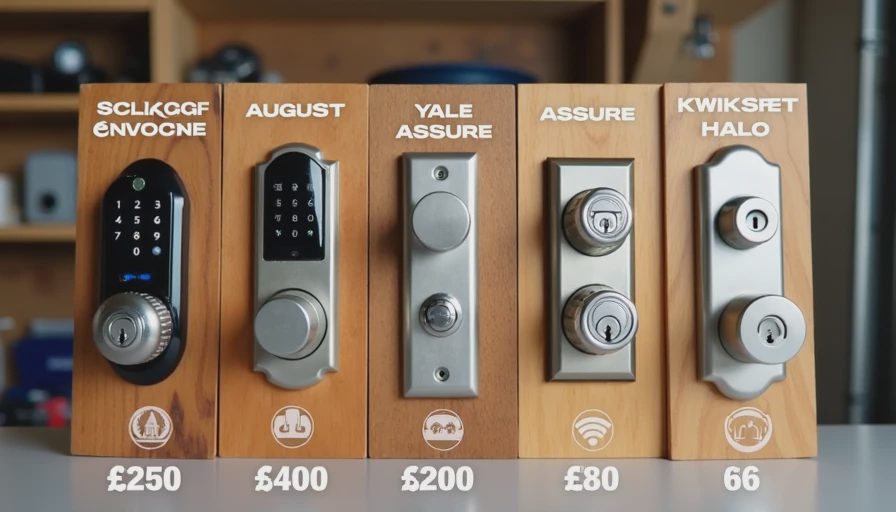
Schlage Encode (Wi-Fi built-in)
August Wi-Fi Smart Lock (3rd generation)
Yale Assure Lock SL
Kwikset Halo
A budget touchscreen model (under $120)
I installed all of them on our front door or side door at different times and used them daily with two kids, Wendy, and frequent visitors.
What actually matters for families
Reliability & Battery Life
This is #1. Nothing is more annoying than your lock dying at 10 PM when you’re carrying groceries and the kids are tired.
Schlage Encode has been the most reliable. The batteries last 6–8 months with heavy use. The August needed battery changes every 3–4 months. The budget one died twice in winter.
Keypad vs App
Kids and guests prefer a physical keypad. My 9-year-old can use the Schlage keypad easily. The August (no keypad version) frustrated visitors who didn’t have the app.
Physical Key Backup
I always want a traditional key as backup. All of them have this, but some hide the keyhole better than others.
App Experience and Connectivity
The Schlage app is straightforward. August has the nicest interface but sometimes loses connection. Yale and Kwikset are okay but have occasional glitches.
Installation Difficulty
All of these are relatively easy to install if you’re replacing an existing deadbolt, but some require more precise drilling.
My real-world ranking
Best Overall for Families: Schlage Encode
This is the one currently on our front door and the one I would buy again tomorrow.
Pros:
Built-in Wi-Fi (no extra bridge needed)
Excellent keypad that kids and grandparents can use
Very reliable battery life
Solid mechanical feel — doesn’t feel cheap
Good integration with Alexa and Google
Strong security features
Cons:
A bit more expensive (usually $230–$280)
App is functional but not the prettiest
It just works. We’ve had zero lockouts, and it handles our chaotic family schedule perfectly — kids letting themselves in after school, package deliveries, grandparents visiting, etc.
August Wi-Fi Smart Lock
Great if you want the most modern experience and already use their ecosystem. The door sense feature (knowing if the door is open or closed) is excellent. However, battery life is average and it occasionally needs resetting. Good, but not my top pick for simplicity.
Yale Assure Lock
Very well built and quiet operation. The keypad version is solid. I liked it a lot, but the app is a little clunky compared to the others.
Kwikset Halo
Decent price and works okay, but I had more connectivity issues than with Schlage. The finish also showed wear faster.
The Budget Option
Bought it on sale. It worked for about 10 months, then started having major issues with the motor and app. Not worth saving $100+.
Key lessons after five locks
Don’t cheap out on the main door.
The front door lock gets used multiple times every day. Spending an extra $80–$100 for reliability is worth it.
Keypad is important for families.
Not everyone wants (or should need) their phone to open the door. Kids, in-laws, babysitters, and delivery drivers all benefit from a good physical keypad.
Battery life matters more than you think.
In Ohio winters, cold drains batteries faster. A lock that needs changing every 3 months becomes annoying fast.
Wi-Fi built-in vs Bridge
Built-in Wi-Fi (Schlage Encode, Kwikset Halo) is much more reliable than ones that need a separate bridge (some August models).
Integration with the rest of the house
We use Alexa, so locks that work well with it get bonus points. But I don’t overcomplicate it — the lock should work even if the internet is down.
Real family scenarios that tested them
Kids coming home from school and letting themselves in
Package delivery people leaving boxes inside when we’re not home
Wendy forgetting her keys (multiple times)
Winter mornings when the door is frozen and the lock still works
Babysitter needing easy access
The Schlage handled all of these without drama.
What I wish I knew before buying the first one
Test the mechanical part thoroughly — smart features don’t matter if the deadbolt sticks.
Buy extra batteries when you get the lock.
Set up all user codes and schedules immediately.
Have a physical key hidden outside as backup (we use a coded key box now).
Consider your internet reliability before choosing.
My current recommendation
For most normal families like ours, I recommend the Schlage Encode (keypad version with Wi-Fi). It strikes the best balance of reliability, ease of use, and features without being overly complicated.
If you’re deep in the Apple ecosystem, the August might make more sense. If you want to spend less, look for sales on Yale or Kwikset, but don’t go too cheap.
Smart locks are genuinely useful once you find the right one. They’ve made our daily life smoother — fewer lost keys, better peace of mind when we’re away, and convenient access for the family.
But they’re not magic. The mechanical quality still matters most. After five tries, I finally have one I don’t think about anymore — which is exactly what you want.
I’ve already wasted money and time on the ones that didn’t work well. You don’t have to.
The money saved by choosing the right lock the first time is enough to buy a case of beer. Maybe even a nice new drill.
Don’t worry, it’s not expensive to get a good one — once you know which to pick.



No letters yet — pray write the first.